- Home
- Study model analysis
Free plan, no sign-up needed to try
Study model analysis in your browser
Simplified Cast opens 3D scans of the upper and lower study models. You mark the teeth and landmarks, and it works out the space and tooth-size analyses, each next to its norm. No scan? Type caliper widths instead. Print the report or save it as a PDF.
- Scans open on your device
- Works offline
- Phone, tablet or computer
What it does
You mark the points. The tool measures, compares each reading with its norm and builds the report.
Analyses included
Space, tooth-size and arch analyses for the permanent and mixed dentition.
Bolton
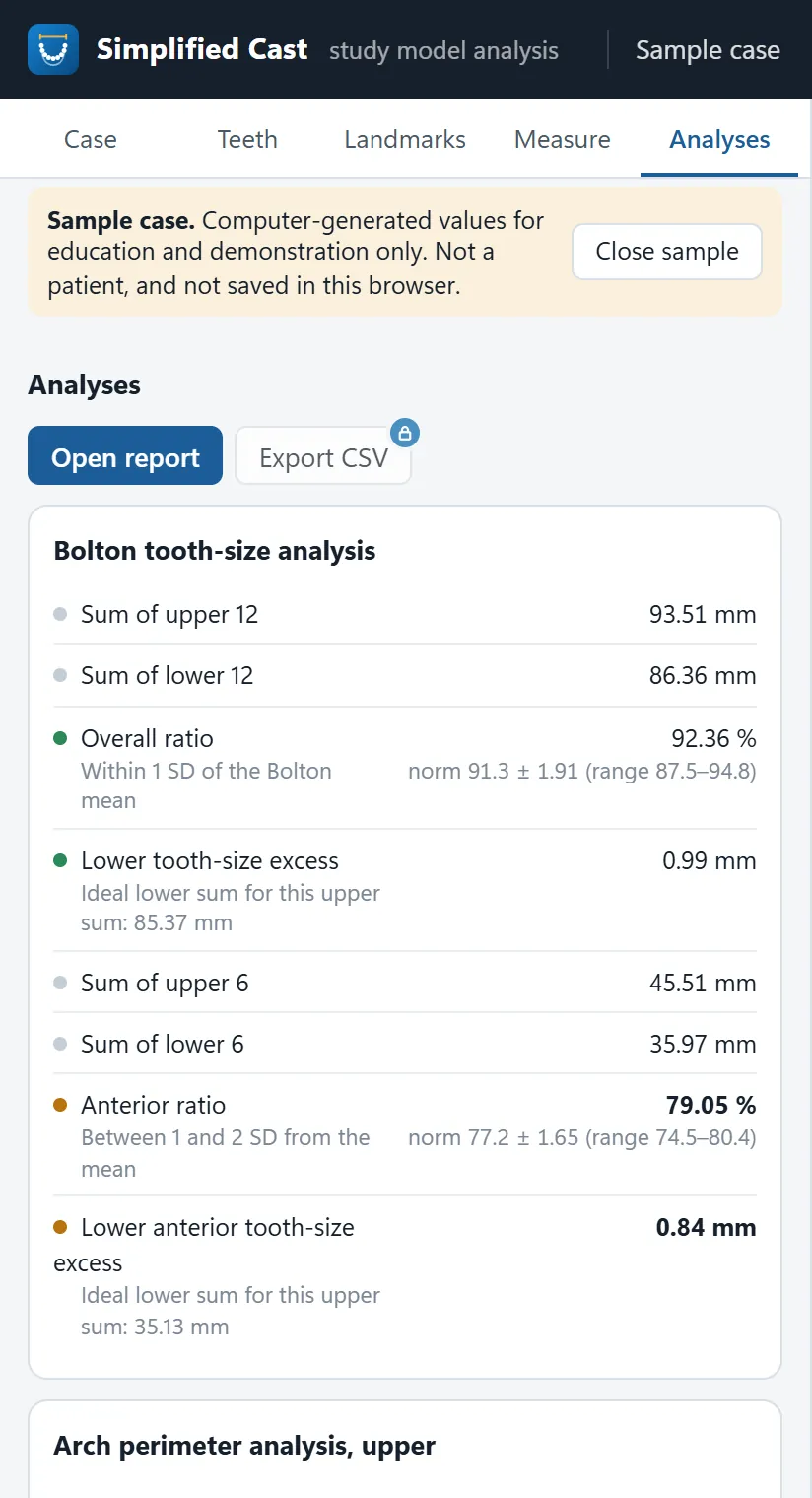
Overall and anterior tooth-size ratios, with the tooth-size excess in millimetres.
Arch perimeter and Carey
Space available against space required: arch perimeter analysis on the upper arch, Carey’s analysis on the lower.
Tanaka-Johnston and Moyers
Mixed dentition space analysis (Tanaka-Johnston, Moyers): estimated widths of unerupted canines and premolars.
Supporting zones
Measured supporting zones against Moyers 75%, Droschl and mean values.
Arch depth
Total, anterior and posterior arch depth, measured as defined by Moyers and Bishara.
Segmental space analysis Plus and Pro
Lundström’s analysis: space available and required in six segments of each arch.
Discrepancy calculation Plus and Pro
Dental and sagittal discrepancy, with the curve of Spee and the incisor position to N-Pog.
Radiographic estimate Plus and Pro
Nance and Huckaba, and the combined method of Hixon-Oldfather and Staley-Kerber.
Arch width Plus and Pro
Pont, Linder-Harth, Schmuth, Ritter and Weise, plus intercanine, interpremolar and intermolar widths.
Korkhaus Plus and Pro
Anterior arch length and palatal height.
Apical base Plus and Pro
Howes’ analysis and Rees’ apical base analysis.
Curve of Spee Plus and Pro
Depth on each side and the arch length needed to level it.
Irregularity and incisor shape Plus and Pro
Little’s irregularity index and the Peck and Peck index of the lower incisors.
Symmetry Plus and Pro
Transverse, anteroposterior and tooth-size symmetry, and signs of mesial position of the upper posterior teeth (Schmuth, Hausser).
Vertical tooth position Plus and Pro
Each tooth against the occlusal plane.
Examination of the occlusion Plus and Pro
Overjet, overbite, open bite, midline, and the molar and canine relations, in one table.
Study cast record sheet Plus and Pro
A summary of the transverse, sagittal and vertical readings for each arch, in the report.
Each analysis cites its published source, in the app and on the report. Most norms come from specific study groups, so read them with your patient’s age, sex and ethnic background in mind.
See it in use
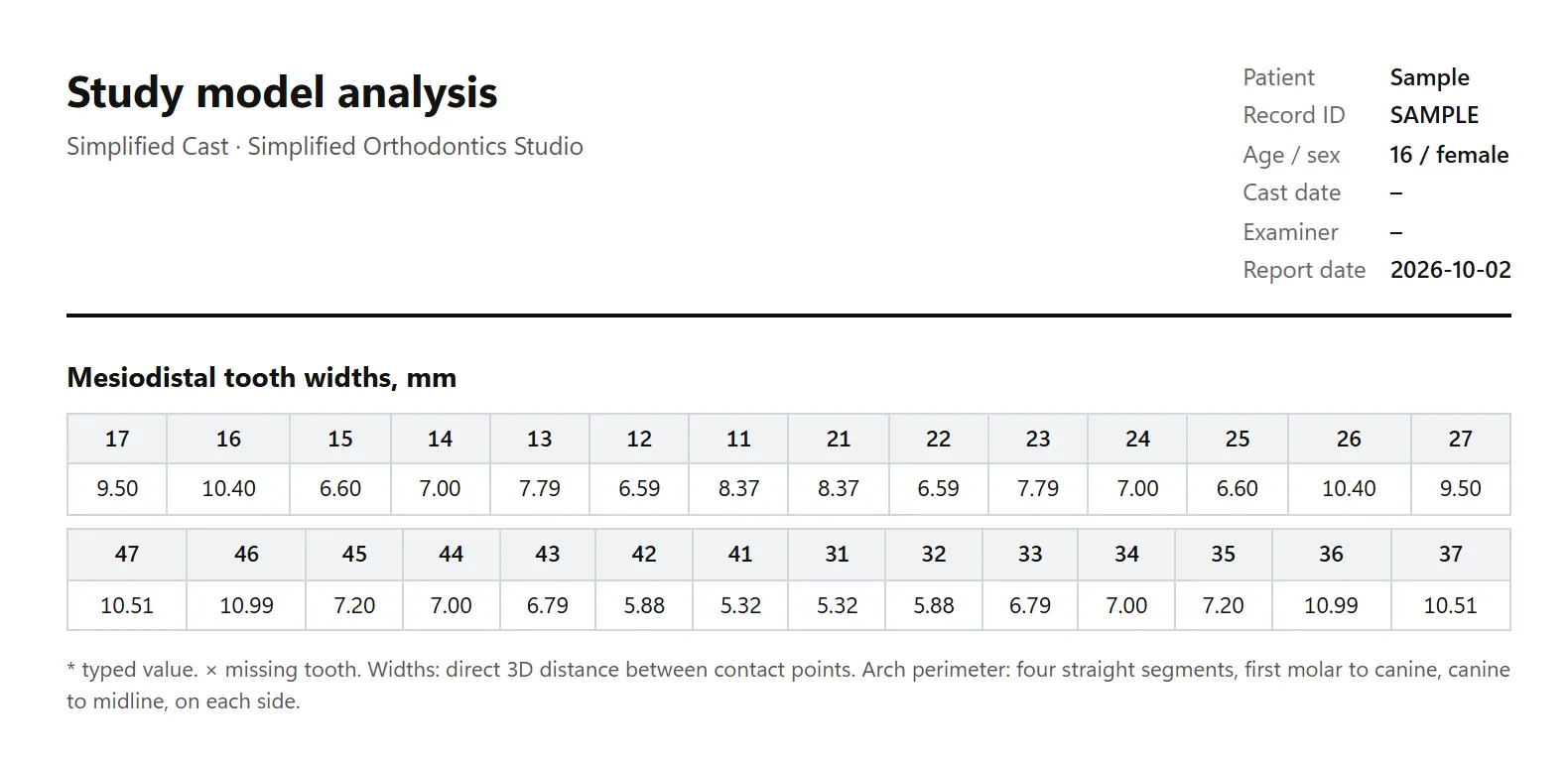
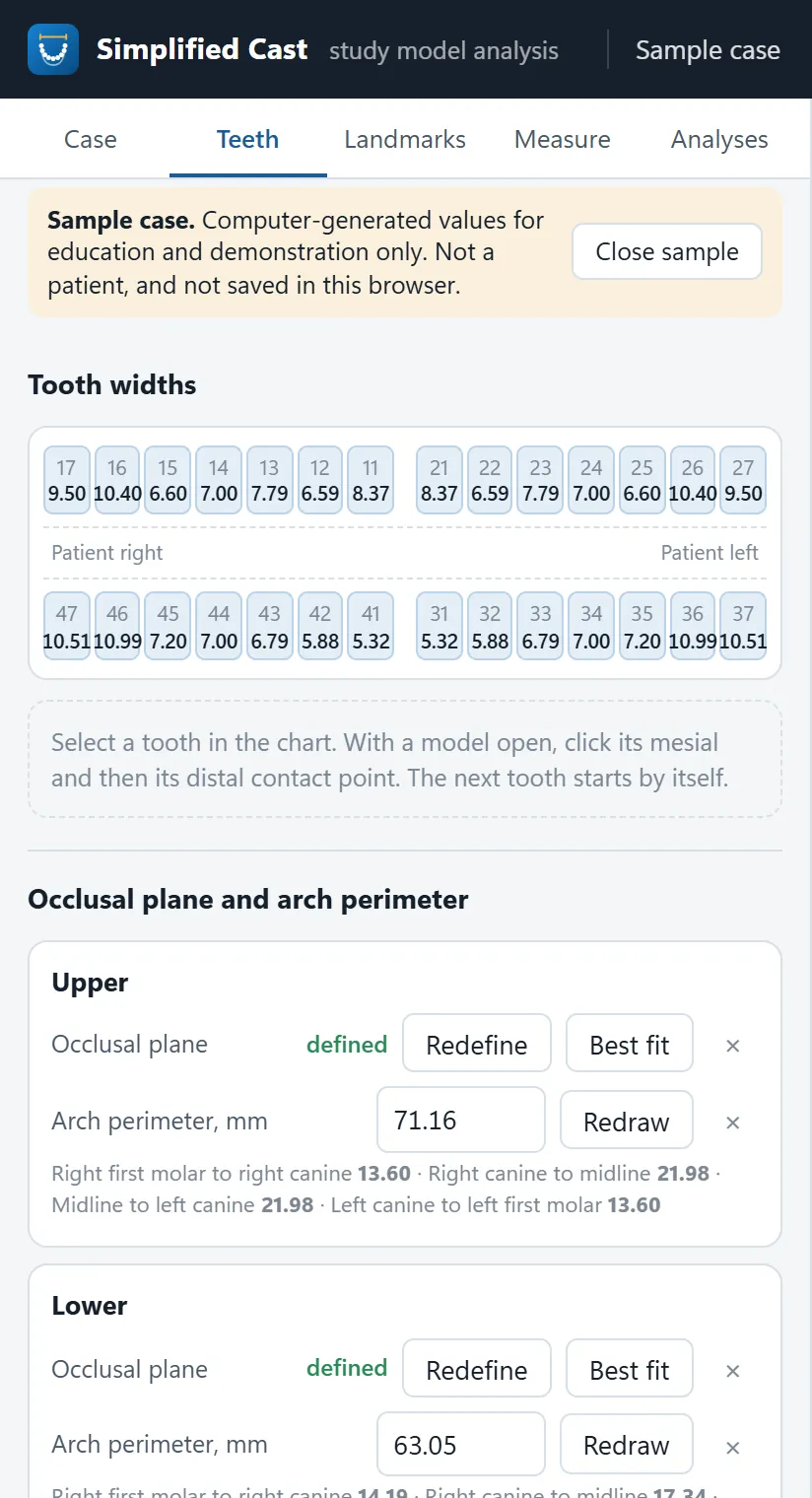
Screenshots of the built-in sample case. Its values are computer-generated: it is not a real patient and not a real scan. The sample has no 3D model, so the 3D view is not shown.
How it works
From the scans to the report in five steps.
- Open the modelsThe upper and lower scans as STL, PLY or OBJ files. Or type caliper widths instead.
- Measure the teethClick the mesial and distal contact point of each tooth. The next tooth starts by itself.
- Draw each archDefine the occlusal plane and draw the arch perimeter.
- Add the landmarksPlace the points the analyses need and record the occlusion.
- Build the reportPrint it, save it as a PDF, or save the session to reopen later.
Questions
Is Simplified Cast free?
Yes, there is a Free plan with the Bolton, arch perimeter and Carey, Tanaka-Johnston and Moyers, supporting zones and arch depth analyses. Plus and Pro add more new cases a month, the other analyses, the study cast record sheet and CSV export. The sample case never counts as a case. See the plans.
Do I need to install anything?
No. It opens in the browser on a phone, tablet or computer. You can also install it like an app, and after the first visit it works offline.
Are my scans uploaded?
The models open and are measured in your browser, and your work is saved on your device first. If you sign in, your current case, including the model files, is also copied to your private Studio cloud, so it opens on your other devices. Privacy policy.
Which files can I open?
STL, PLY or OBJ models, one for the upper arch and one for the lower, in millimetres. If your scans use another unit, set the model unit scale in the case settings.
Can I use it without a scan?
Yes. Type the caliper widths in the Teeth tab and the arch perimeter by hand, and the analyses that use them still run. To look around first, open Simplified Cast and choose Load sample case.
What is Simplified Cast for?
Analysis, education and research. It measures what you mark and compares it with published norms. The readings support your clinical judgment and do not replace it. It is not a medical device.
The other tools in the Studio
One studio, five tools. Each one opens in the browser, works offline and has a free plan.
Try it on the sample case.
Open Simplified Cast and load the sample case. No sign-up needed.